Climbing Grade Converter2.22
Publisher Description
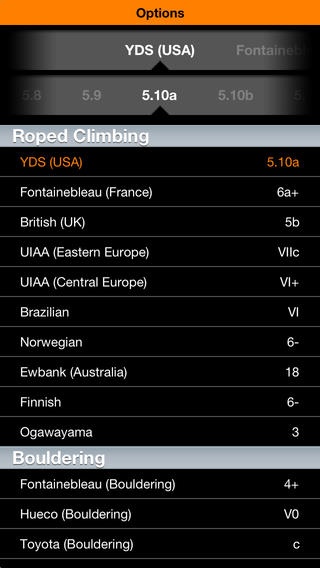
Climbing Grade Converter is a simple tool used to help rock climbers understand the different grading systems used around the world. Currently the app converts between 13 different climbing grading systems including bouldering systems.
Keep in mind that climbing grades are subjective and are agreed upon by a consensus. Also, there is disagreement on how certain systems convert to other systems since different systems take into account different factors (i.e. hardest move, overall difficulty, etc). I've attempted to compile all data I could find to create the most comprehensive conversion tool I could.
Help support a fellow climber!
Grading Systems Included:
Yosemite (YDS)
French
British
British Adjectival
Saxon
UIAA (Central Europe)
Ewbank (Australia)
South Africa
Brazilian
Norwegian
Finnish
Kyrgyzstan
Ogawayama (Bouldering)
Fontainebleau (Bouldering)
Hueco (Bouldering)
Toyota (Bouldering)
Requires iOS 5.0 or later. Compatible with iPhone, iPad, and iPod touch.
About Climbing Grade Converter
The company that develops Climbing Grade Converter is Blue Fusion Technologies, LLC. The latest version released by its developer is 2.22.
To install Climbing Grade Converter on your iOS device, just click the green Continue To App button above to start the installation process. The app is listed on our website since 2009-06-19 and was downloaded 4 times. We have already checked if the download link is safe, however for your own protection we recommend that you scan the downloaded app with your antivirus. Your antivirus may detect the Climbing Grade Converter as malware if the download link is broken.
How to install Climbing Grade Converter on your iOS device:
- Click on the Continue To App button on our website. This will redirect you to the App Store.
- Once the Climbing Grade Converter is shown in the iTunes listing of your iOS device, you can start its download and installation. Tap on the GET button to the right of the app to start downloading it.
- If you are not logged-in the iOS appstore app, you'll be prompted for your your Apple ID and/or password.
- After Climbing Grade Converter is downloaded, you'll see an INSTALL button to the right. Tap on it to start the actual installation of the iOS app.
- Once installation is finished you can tap on the OPEN button to start it. Its icon will also be added to your device home screen.
